
Automate Your KeyShot Rendering
Render hundreds of CAD files at once. Work in the background with headless mode, save time, and increase efficiency.
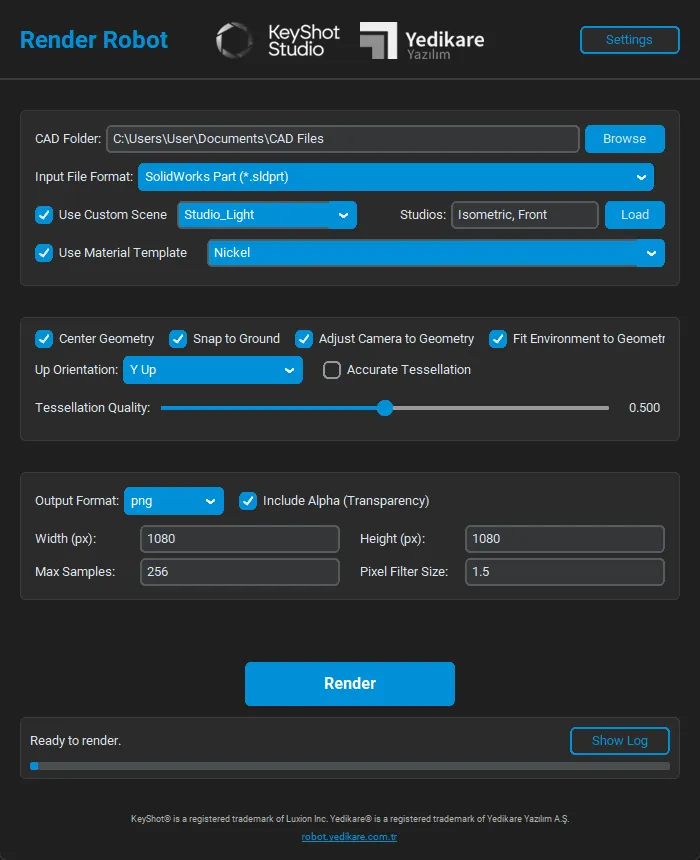
Why Render Robot?
Stop manual rendering processes. Meet Render Robot.
Batch Processing
Queue all CAD files in a folder with a single click and start rendering.
Headless Mode
Render in the background without opening the KeyShot interface. Keep using your computer.
Smart Templates
Save material and environment settings as templates, apply automatically to all files.
Wide Format Support
Directly supports STEP, IGES, SolidWorks, Rhino, and 30+ different 3D file formats.
User Friendly
No need to write complex scripts. Start immediately with a simple and understandable interface.
Flexible Output
Get render outputs in JPG, PNG, PSD formats at any resolution you want.
How It Works?
Start your batch rendering process in 3 simple steps.
Select Files
Select the folder containing the CAD files you want to render.
Configure Settings
Set the output folder, resolution, and the template you want to use.
Start
Start the rendering process and sit back. Let the Robot work for you.
Supported Formats
We support all industry-standard 3D formats.
Universal Formats
- STEP (*.stp, *.step)
- IGES (*.igs, *.iges)
- Parasolid (*.x_t)
- JT (*.jt)
SolidWorks
- Part (*.sldprt)
- Assembly (*.sldasm)
Solid Edge
- Part (*.par)
- Assembly (*.asm)
- Sheet Metal (*.psm)
Autodesk Inventor
- Part (*.ipt)
- Assembly (*.iam)
CATIA
- CATPart
- CATProduct
- CATDrawing
- CGR
PTC Creo
- Part (*.prt)
- Assembly (*.asm)
Other CAD
- Rhino (*.3dm)
- NX/UG (*.prt)
- AutoCAD (*.dwg, *.dxf)
- SketchUp (*.skp)
Mesh Formats
- FBX
- OBJ
- STL
- 3DS
- Collada
- 3DXML
- Maya
Devote Your Time to Creativity
Don't waste time with repetitive boring rendering processes. Let Render Robot process thousands of files for you while you focus on your new designs.
- Time Saving: Save up to 90% time compared to manual processes.
- Consistent Results: Maintain the same angle, light, and material quality in all your products.
- High Efficiency: Run it at night or on weekends, use your working hours efficiently.
- Easy Integration: Works compatibly with your existing KeyShot license, no extra installation required.

Download Now
Test Render Robot with a 15-day free trial version.
System Requirements
KeyShot License Required
Render Robot requires KeyShot to be installed and activated. If you don't have a KeyShot license yet:
Explore KeyShot License Options